Built for Broker Price Opinions · 24/7 · 365 days a year

Receive 80% more BPO orders.

Your always-on assistant works 24/7, accepting eligible orders the instant they hit your inbox — before your phone even buzzes.

JMARSKLP+
Trusted by hundreds of brokers across the U.S.
Supports 13 of the major BPO vendors
National vendors Regional vendors Drive-by orders Interior BPOs Inspection orders + exclusive feeds
By the numbers

An always-on assistant
that never sleeps.

While you're driving, sleeping, or with clients — our cloud algorithm is busy parsing your inbox and locking in orders the moment they're broadcast.

13
Major vendors included
out of the box.
4–12 sec
Average time from email
broadcast to accepted.
24/7
Works round the clock,
365 days a year.
35K+
Orders accepted by
BpoFlow so far.
Features

Built for brokers who can't
watch their inbox 24/7.

Real-time email parsing, smart filtering, and login-aware acceptance — across all the vendors that matter.

Real-time inbox capture

Forward your vendor emails to your unique BpoFlow address. We parse the moment they hit the server — before your phone even buzzes.

Smart filtering rules

Set zip codes, minimum fee, and daily order limit. We only accept what matches — no rogue orders, no surprises on your invoice.

Login-aware acceptance

For vendors that need a website login to confirm the order, BpoFlow handles the sign-in and captcha automatically — under your local IP.

Live analytics

See exactly which orders were accepted, missed, and why. Daily, weekly, and per-vendor breakdowns — so you can tune your filters.

Local IP for security

Acceptance happens from a local IP that matches your region — keeping your vendor accounts safe and compliant.

Pay only on success

$2 per accepted BPO. $1 per inspection. If we don't capture the order, you don't pay — simple as that.

How it works

Set it up once.
Capture orders forever.

Three short steps. You'll be live in under ten minutes.

Step 01 · Connect your inbox

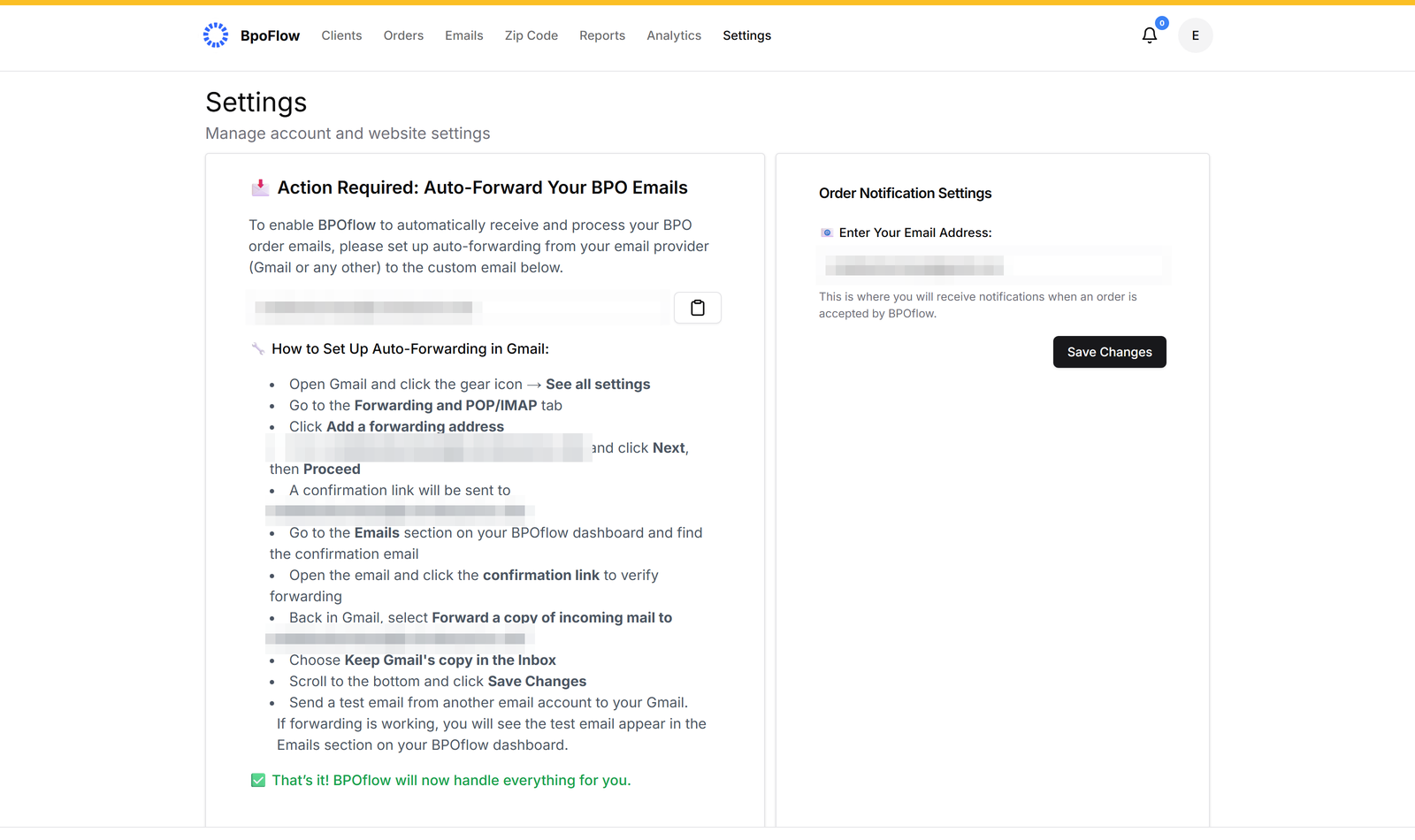
Auto-forward vendor emails to your unique BpoFlow address.

We give you a dedicated address on signup. Set a one-line forwarding rule in Gmail/Outlook and we'll start parsing instantly.

  • Works with Gmail, Outlook, Yahoo, and IMAP
  • Local IP per region for added security
  • End-to-end encrypted, never stored beyond audit
IMAP settings screen
Step 02 · Add your vendors

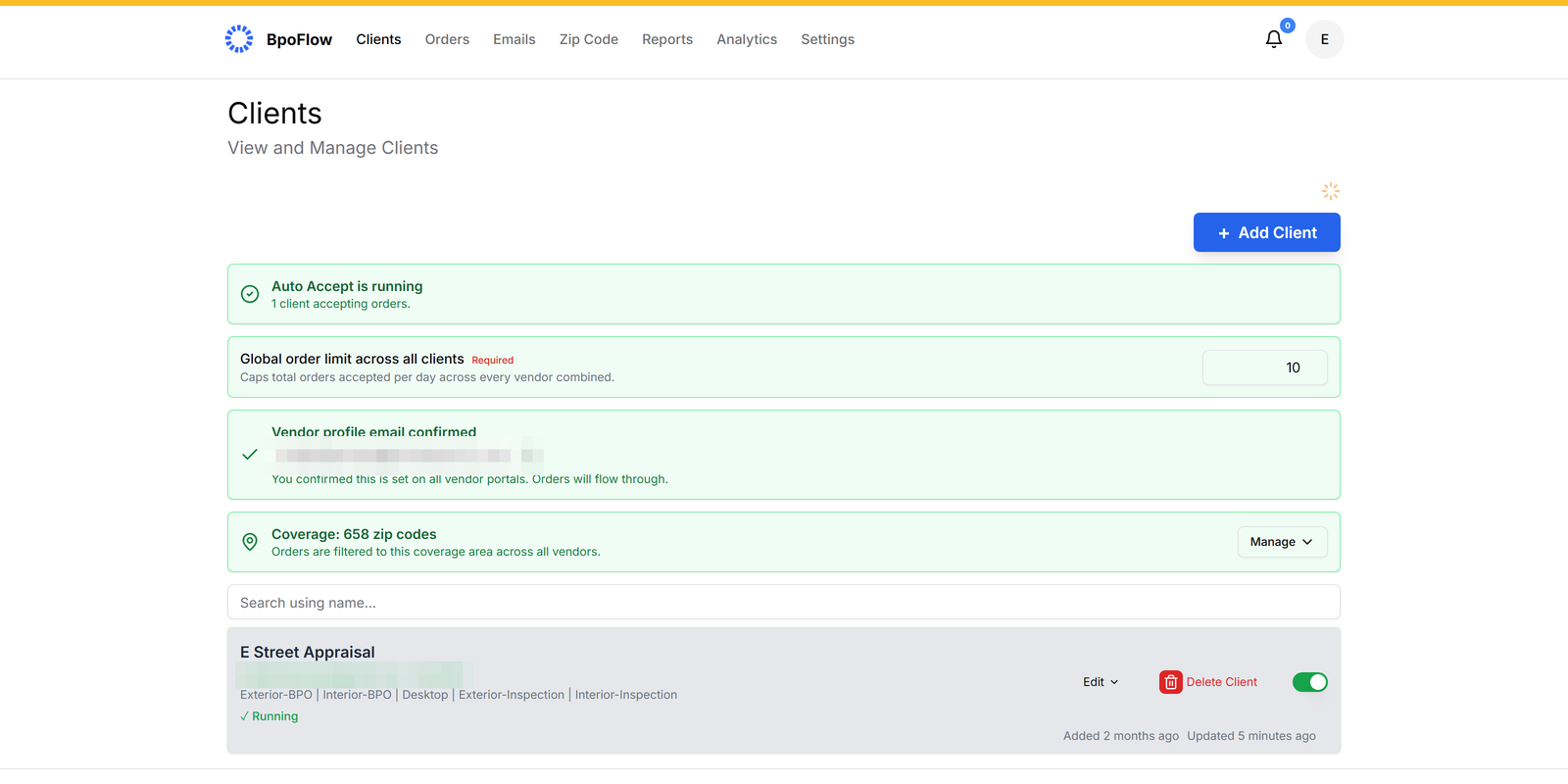
Pick the BPO companies you work with — 13 included.

Enter your existing login credentials for vendors that require website acceptance. We handle captcha and complex flows under the hood.

  • Works across the 13 major BPO vendors brokers use
  • Credentials encrypted at rest, never visible to staff
  • Toggle each vendor on/off in one click
Add a client screen
Step 03 · Set your rules

Tell us which orders to take — and which to skip.

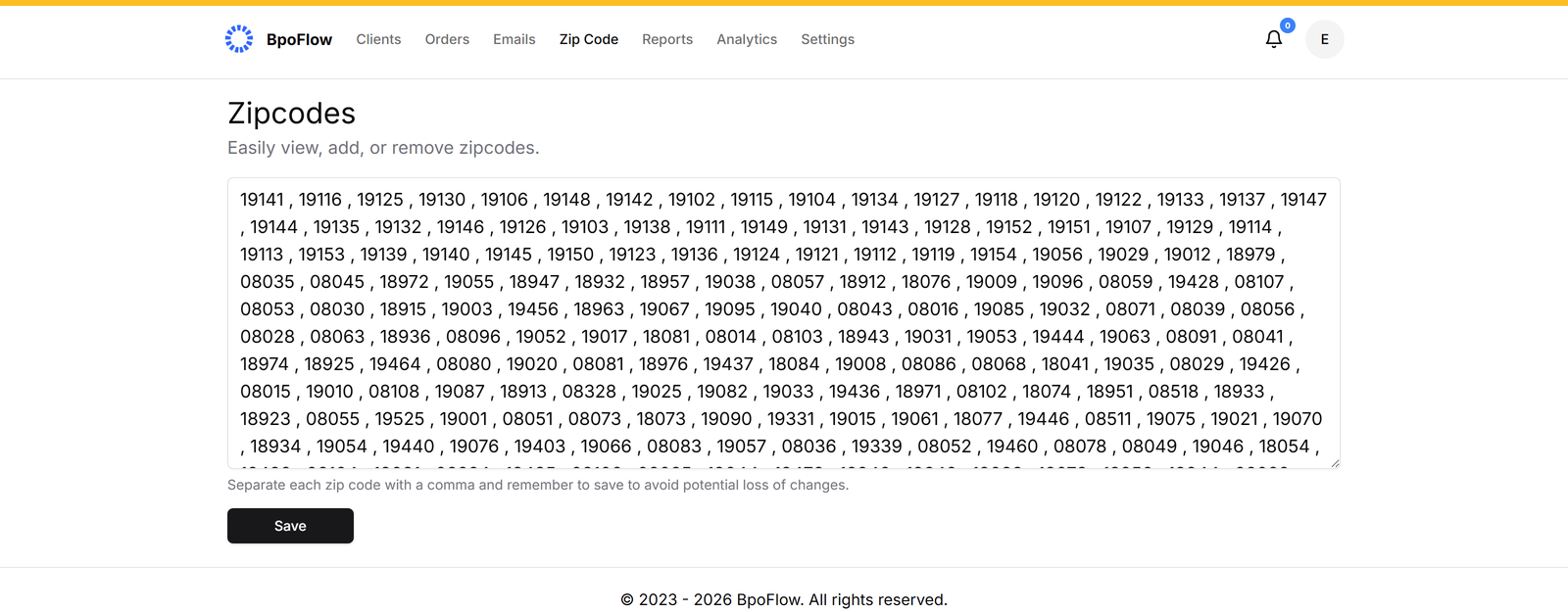
Filter by zip code, minimum fee, and order type. Set a daily cap so you never overcommit. Adjust anytime from the dashboard.

  • Per-vendor minimum fee thresholds
  • Zip-code allow lists with radius support
  • Daily order limits to pace your workload
Edit client filtering rules
How BpoFlow operates

Your authorized assistant —
not a third party.

BpoFlow is a tool you operate. It runs under your direction, using credentials you provide, performing the same steps you would perform manually — just faster. You stay fully in control.

You authorize, we act.

BpoFlow only operates with the access and credentials you've explicitly granted. It performs the same email checks and acceptance steps you would — instantly, on your behalf.

You set the rules.

Filters, minimum fees, ZIP codes, daily caps — every parameter is yours. BpoFlow never accepts anything outside the criteria you've configured.

You stay in charge.

Pause, adjust filters, or cancel anytime from your dashboard. Every action is recorded in a full audit log so you know exactly what was accepted on your behalf.

A note on independence. BpoFlow is an independent automation tool. We're not affiliated with, endorsed by, or partnered with any BPO vendor. All third-party names and marks belong to their respective owners. You remain solely responsible for ensuring your use of BpoFlow complies with the terms of service of any vendor whose orders you accept.

Pricing

Two simple charges.
No surprises.

A one-time setup fee gets you provisioned. After that, you only pay when we win you an order.

ONE-TIME · TO GET YOU LIVE

Setup & onboarding

$199
one-time fee

Covers provisioning your custom domain, your dedicated IP, and a guided onboarding session — so you're ready to capture orders from day one.

Custom domain
@yourname.customdomain.com
Dedicated IP address
Local to your region · stable reputation
Guided setup & onboarding
1:1 session · live in under an hour
PER ACCEPTED BPO ORDER

Pay-as-you-go

$2
/ accepted BPO order

*Charged only for orders accepted via BpoFlow, including exclusive orders. Inspection orders are $1 each.

  • Orders accepted in 4–12 seconds
  • 13 major BPO companies included
  • Local IP for added security
  • Set daily order limit
  • Advanced analytics dashboard
  • Complex captcha resolution
A note on timing

Email timing & order availability explained.

Vendors often prepare and schedule order emails in advance. By the time the email is sent out, some orders may have already been canceled, updated, or not gone live yet.

Emails are also sometimes sent in batches — which means other brokers may receive them before we do, depending on how the batch delivery is arranged by the vendor's email system. As a result, some orders may already be claimed by the time we receive them. Read more.

We know missed auto-accepts are frustrating, and we're committed to transparency and continuous improvement. Have questions? Write to us at support@bpoflow.com.

FAQ

Frequently
asked questions.

We've compiled the most important information to help you get the most out of your experience.

support@bpoflow.com

BpoFlow fetches your broadcast email in real time and, based on the criteria you've entered, decides to accept or reject it instantly. For details about limitations and other technical details, click here.

Once you sign up, you'll be assigned a unique email address — you simply auto-forward your vendor emails to it. You also enter your minimum order fee, the zip codes you cover, login details (for vendors that need website login to accept orders), and a daily order limit. That's it. For detailed instructions, click here.

Orders are usually auto-accepted within 4–12 seconds, depending on the vendor. If the order needs to be accepted by logging into the vendor website, the accept time may be on the higher side.

You'll only be charged for orders that are accepted by the system, at $2 per BPO order and $1 per inspection order.

The $199 setup fee is a one-time charge that covers provisioning your custom BpoFlow domain, your dedicated local IP address, and a guided onboarding session to get your account live. After this, you only pay $2 per accepted BPO order ($1 per inspection). Our algorithm runs 24/7 — accepting or rejecting orders against your rules — so the setup fee also covers the infrastructure that keeps that always-on service running for you.

No — BpoFlow doesn't sign up vendors. It only automates order acceptance. You must have existing BPO vendor accounts to receive orders.

Start capturing the orders
you're currently missing.

No subscription. Pay only when an order is accepted.